Creating New Map: copy/paste an existing map folder, rename and edit sanmap file in tex editor
---
EDITOR BRUSH HEIGHT SETTINGS
---
- Target Value:
Value between 0-255 representing the Gray value (Height Value) that the brush is "attempting" to paint
This will also act as a Max Height. If set to 128, brush will "max out" and create plateaus at 128
- Opacity:
Controls ho "strong" the brush will paint the Target Value. Lower setting will take longer for brush to reach Target Value.
- Slope Min/Max:
Controls the amount of slope allowed when "painting". Will only allow painting on these slope values. If Min is set high, will not "paint" on flat terrain. If Max is set low, will not "paint" on terrain with high slopes like mountains, cliffs etc.
- Value Min/Max:
The highest or lowest value brush will paint. Setting max will set the highest value brush will paint - creating plateaus at tha given height. Setting Min will set the lowest height brush will allow when holding "Alt" to lower/subtract
My Getting Started Video:
Download Editor:
 drive.google.com
---
EDITOR LAYER SETTINGS
---
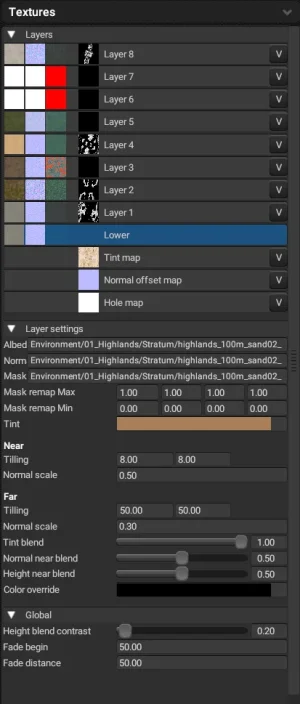
Tint: Texture Albedo Multiplied by Tint
Near & Far:
Tiling: Tiling of Textures at Distance rom Camera
Normal Scale: Intesity of Normal at Distance from Camera
Tint Blend: Percentage? of tint at Distance from Camera
Normal & Height Near Blend: Percentage of Near values blended at Distance of Camera
Global:
Height Blend Contrast: How sharp the Height Blend is Between Layers
Fade: Distance to begin fade and Distance of Fade to final value
---
EDITOR BRUSH HEIGHT SETTINGS
---
- Target Value:
Value between 0-255 representing the Gray value (Height Value) that the brush is "attempting" to paint
This will also act as a Max Height. If set to 128, brush will "max out" and create plateaus at 128
- Opacity:
Controls ho "strong" the brush will paint the Target Value. Lower setting will take longer for brush to reach Target Value.
- Slope Min/Max:
Controls the amount of slope allowed when "painting". Will only allow painting on these slope values. If Min is set high, will not "paint" on flat terrain. If Max is set low, will not "paint" on terrain with high slopes like mountains, cliffs etc.
- Value Min/Max:
The highest or lowest value brush will paint. Setting max will set the highest value brush will paint - creating plateaus at tha given height. Setting Min will set the lowest height brush will allow when holding "Alt" to lower/subtract
My Getting Started Video:
Download Editor:
map-editor v0.16 – Google Drive
drive.google.com
---
EDITOR LAYER SETTINGS
---
Tint: Texture Albedo Multiplied by Tint
Near & Far:
Tiling: Tiling of Textures at Distance rom Camera
Normal Scale: Intesity of Normal at Distance from Camera
Tint Blend: Percentage? of tint at Distance from Camera
Normal & Height Near Blend: Percentage of Near values blended at Distance of Camera
Global:
Height Blend Contrast: How sharp the Height Blend is Between Layers
Fade: Distance to begin fade and Distance of Fade to final value